
Hey, welcome to my little corner, my name is Godstime. Let me tell you a quick story…
When I launched my first website years ago, I genuinely believed something magical would happen. I will just automatically start getting thousands to millions of visitors. I published about five blog posts, sat back, refreshed Google Analytics every few hours, and waited for the traffic to pour in.
Nothing happened.
Zero visitors came.
Okay, maybe one visitor. But I’m pretty sure that was me checking the website from my phone chrome browser.
At that moment I realized something very important, building a website is easy, but ranking it on Google and other search engines is the real game.
And honestly? I made a lot of SEO mistakes early on. I targeted impossible keywords to rank on. Ignored search intent. Wrote blog posts nobody was searching for. Basically, I did everything wrong.
But after years of testing, failing, and finally seeing pages climb to the first page of Google, I started to understand how SEO actually works.
If you’re trying to figure out how to rank your website, this guide will walk you through the strategy that works today. Not theories. Not outdated tricks. Just practical SEO that will work for you.
Why Most Websites Never Rank on search engines
Before we get into strategies, we need to address the uncomfortable truth.
All most every websites fails at SEO.
Not because Google is unfair. But because people choose to skip the fundamentals.
Here’s a rough statistic that SEO professionals quietly acknowledge. About 90% of web pages get zero organic traffic from Google.
Yes, I said zero.
That means if like 100 articles are published today, maybe 5 or 15 will receive meaningful search traffic.
So what separates the winners from the invisible websites?
Let me show you the usually five things:
-
Poor keyword research
-
Weak content
-
Lack of backlinks
-
Slow websites
-
Inconsistent publishing
Fix these, and you’re already ahead of most websites online.
Step 1: Start With Keyword Research (This Is the Foundation)
If SEO were a house, keyword research would be the foundation of that house.
Without it, everything collapses, 100%.
Here’s a mistake I made early on in my life.
I wrote a 3,000-word article about “Road to success, the mindset strategies.”
It took my blood and sweat plus two days to write.
Did I get traffic?
Only five visitors in three months.
Why? Because nobody was searching for that keyword phrase.
Keyword research simply means finding the exact phrases people usually type into Google.
Let me give you an example:
Instead of targeting something broad like:
“Make money online”
You might target:
-
“How to make money online for beginners”
-
“How to make money online without investment”
-
“Side hustles that work in 2026”
These long-tail keywords you see above are easier to rank for and attract more targeted readers.
Tools people commonly use include:
-
Google autocomplete
-
Keyword research tools
-
Competitor analysis
Even simple Google searches can reveal what people want.
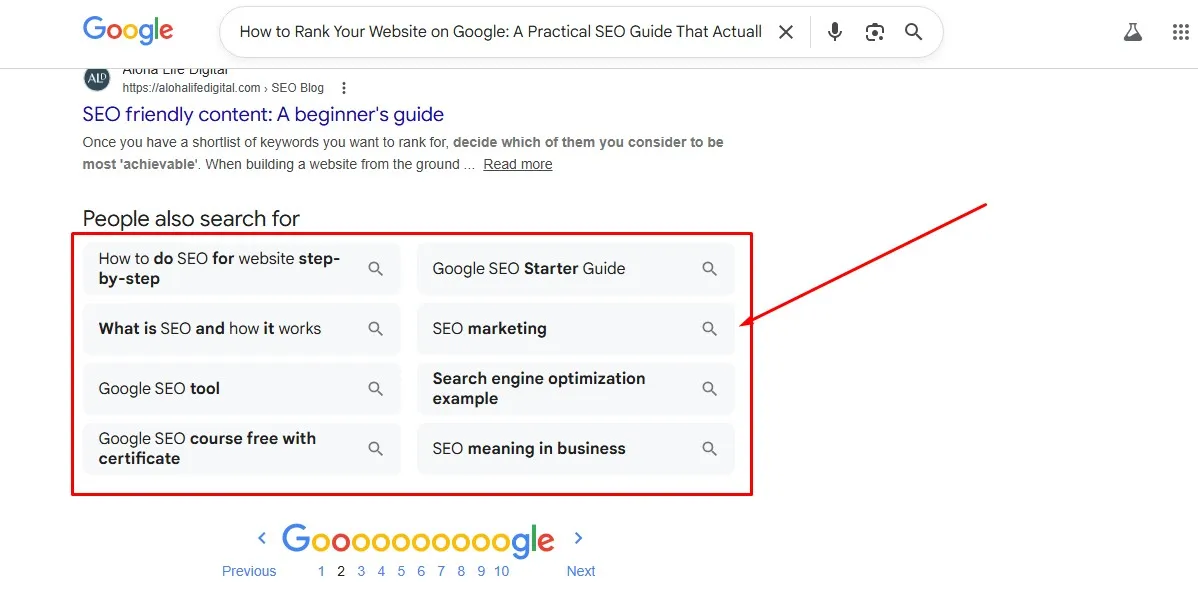
Type a keyword and look at the “People Also Search for” section. Those questions are literally SEO gold.
Step 2: Understand Search Intent (This Is Where Many People Fail)
Here’s something most beginners overlook.
Google doesn’t rank content just because it contains the keyword.
It ranks content that matches search intent.
Search intent means understanding why someone typed that query, like How to start a business blog
For example, if someone searches:
“Best laptops for blogging”
They don’t want a history of laptops. They want laptop recommendations for blogging.
If someone searches:
“How to start a business blog”
They want a step-by-step guide.
I once wrote an article targeting a keyword that was clearly informational, but I filled it with product promotions.
Google didn’t rank it.
When I rewrote the article to actually answer the question properly, rankings improved within a few weeks.
The lesson I learnt.
Always match your content to the reader’s goal.
Step 3: Create Content That’s Better Than What Already Exists
Let me be straight forward with you.
Google already has millions of articles on almost every topic imaginable.
So if your content is just “average,” it probably won’t rank at all on Google.
Instead, you aim to create something more useful, clearer, or with more details than the existing results.
Here are a few ways to add more details:
-
Add real examples, your viewers can relate to.
-
Include step-by-step instructions for them to follow
-
Use screenshots or visuals where needed
-
Share personal experiences if you can
-
Provide updated information
For example, imagine someone searching “how to start an online side hustle.”
Instead of writing generic advice, you could include:
-
Actual income breakdowns
-
Tools you have used
-
Mistakes you made
Readers love that kind of content.
And Google notices when readers spend more time on your page.
Step 4: Optimize Your On-Page SEO
Once your content is written, you still need to optimize it properly. It’s very Important.
This doesn’t mean, you should start stuffing your article with keywords 50 times. Please don’t do that.
Instead, focus on simple on-page SEO elements like:
Title Tag
Your title should include your main keyword, very important.
Example:
“How to Rank Your Website on Google: Beginner SEO Guide”
Headings (H1, H2, H3)
Break your content into sections using headings.
This helps both readers and search engines understand your structure.
URL Structure
Short and clean URLs work best.
Example:
yourwebsite.com/how-to-rank-your-website
Internal Links
Link to other relevant posts on your website, is also very good.
For example, if you’re reading this article and want to learn more about building a website, check out my other guides like:
Internal links help Google crawl your site and keep readers exploring of your posts.
Step 5: Improve Your Website Speed
Page speed matters more than most beginners even realize.
Imagine clicking a search result and waiting eight seconds for it to load.
You’d probably leave, right?
And Google knows this.
That’s why faster websites often rank better in search.
Things that slow down websites include:
-
Large images
-
Too many plugins
-
Cheap hosting
-
Heavy themes
One time I switched to better hosting like Hostinger and optimized my images.
My page load time dropped from 5.8 seconds to 1.9 seconds.
Within two months, several articles moved up in rankings.
Speed isn’t the only ranking factor. But it definitely helps you get there.
Step 6: Build Backlinks (This Is Where Authority Comes From)
Backlinks are links from other websites pointing to your site.
Think of them like votes of confidence for your website.
If ten credible websites link to your article, Google assumes your content must be valuable.
But here’s the catch.
Not all backlinks are equal.
One link from a respected website can be more powerful than 100 links from low-quality websites.
These are ways to earn backlinks:
-
Guest blogging
-
Creating shareable content
-
Building useful tools or resources
-
Networking with other creators
In one case, a guest post I wrote for another blog sent a backlink to my website.
That single link helped push one of my articles from page 3 to page 1 within two months.
Backlinks still very much matter, in today’s world.
Step 7: Publish Content Consistently
SEO rewards consistency in posting valuable contents.
When you publish regularly, search engines crawl your website more often.
It also increases your chances of ranking.
Here’s a simple math example.
If you publish:
-
10 articles, maybe 1 ranks well
-
If you publish 50 articles, maybe 5 rank well
-
And 100 articles, 10 might rank well
Not every post will succeed, you should always know that.
But more content increases your opportunities.
When I was managing my health blog, I personally noticed significant growth after publishing about 40 articles on the website. Traffic started compounding.
Step 8: Use AI Tools (But Don’t Rely on Them Completely)
Let me tell you something, AI can speed up content creation and research.
You can use AI to:
-
Generate article outlines
-
Brainstorm keyword ideas
-
Improve readability
-
Analyze competitor content
But there’s a mistake some people make.
They generate an entire article using AI and publish it without editing, any of it. You might have come across those type of content.
That usually results in generic content.
Instead, you can use AI as a writing assistant, not a replacement for your knowledge or your brain.
Add your own stories, examples, and opinions, about a given topic.
That’s what makes your content stand out.
Step 9: Be Patient (SEO Takes Time)
Here’s something beginners hate hearing.
SEO is slow.
A new website can take three to six months before seeing meaningful traffic.
Sometimes it might take longer.
I remember checking my analytics daily during my first year of blogging. It felt like watching a paint dry on the wall.
Then suddenly, traffic started climbing little by little.
One article ranked.
Then another, then another.
Momentum builds slowly, then it seems so sudden.
Patience is a vital part of the process.
The Lesson That Changed My SEO Strategy
One of the biggest lessons I learned was this:
Don’t write what you want to say. Write what people are searching for.
Sounds obvious, right?
But many bloggers ignore I have seen ignore this.
When I switched from random topics to keyword-focused articles, traffic increased dramatically.
It wasn’t overnight, that’s true. But it was steady.
And steady growth beats random spikes every single time.
My Final Thoughts
Ranking a website on Google isn’t magic, okay.
It’s a combination of:
-
Smart keyword research
-
High-quality content
-
Proper on-page SEO
-
Backlinks
-
And Consistency
Focus on these fundamentals and you will already be ahead of most websites. I assure you that.
If you’re building your own website and want to learn more, I recommend reading these guides on my blog:
They’ll help you build a strong foundation and help you understand how your website works.
And now I’d love to hear from you.
Are you struggling to rank your website on Google?
Have you tried SEO before but didn’t see results?
Leave a comment below if you have any questions related to this topic or the blog post. I’ll be happy to assist you. thank you for reading.