
Hello, welcome. My name is Godstime, founder of First Guide 247. In this blog post, I want to personally introduce you to the web and how everything on the web is connected in the simplest way possible.
If you are new to the internet, starting an online business, learning digital skills, or just trying to understand how websites work, you are not alone. Many people use the web every day but don’t actually understand what the web is or how it works. My promise to you is simple: by the end of this guide, you will have a clear understanding of the web, its importance, and how to start using it confidently.
This article is written like I’m talking directly to you, no complex grammar, no tech confusion, just clarity. 100% beginner-friendly, so simple…
What Is the Web and Why It Matters
The web (also called the World Wide Web) is a system that allows you to access information, websites, videos, images, and online services through the internet.
Think of it like this:
- The internet is the road
- The web is the houses, shops, and offices on that road
When you open Google, Facebook, YouTube, or a blog like First Guide 247, you are using the web.
Why the Web Matters Today
The web has completely changed how we live and work. Here’s why it matters:
- You can learn anything online
- You can start a business without a physical shop
- You can work remotely from anywhere
- You can connect with people globally
In simple terms, if you understand the web, you unlock opportunities.
Whether your goal is blogging, freelancing, e‑commerce, or digital marketing, everything starts with understanding the web.
How the Web Works (Simple Explanation)
When the first webpage was introduction in August 6, 1991 by Tim Berners-Lee and the Mosaic web browser in 1993. The first webpage was accessed via an IP-address, as the web kept involving domain name was introduced, so that people can easy remember their website location since an IP-address was difficult to remember.
Let me break it down step by step.
Step 1: You Type a Website Address
When you type something like www.firstguide247.com into your browser, you are asking the web to show you the content on that website. The contents on your website is stored on a web server and you need the web to access the server where your website content are kept it.
Think of the server as your physical warehouse where your goods in this case your website content are kept in. You need the web to located your website server that’s why it’s called a web server.
Step 2: The Browser Makes a Request
Your browser (Chrome, Firefox, Safari) sends a request to a web server where the website contents are stored. Your website for instance firstguide247.com is like your physical address. Without your physical address you can’t locate a store or somebody can’t locate your house without your home address right?. That’s how it’s for a website, without you having the correct website address, you can’t locate the website.
Step 3: The Server Responds
When you type the website address on your browser, the web server sends the website files back to your browser.
Step 4: You See the Website
Your browser reads the files and displays the website on your screen.
That’s it. This whole process happens in seconds.
Basic Parts of the Web You Should Know
To fully understand an introduction to the web, you need to know these key parts:
1. Websites
A website is a collection of web pages that share the same domain name. A web page is a singe page of a website, when you now have multiple web pages connected together by hyper-links it’s now called a website
Examples:
- Blogs
- Online stores
- Company websites
2. Web Browsers
A browser is what you use to access the web.
Common examples:
- Google Chrome
- Mozilla Firefox
- Microsoft Edge
3. Web Servers
A web server is a computer that stores websites files e.g videos, images and sends them to people via browsers like chrome, opera mini when they ask for them.
For a more simple example, a web server, is like your physical shop, where you store products that you sell, for anyone to buy your products or know what product you sell. They have to visit your shop right.
That’s how a web server also works for anyone to know the contents on your website, they have to visit your website via a web browser like chrome.
4. Domain/URLs (Website Addresses)
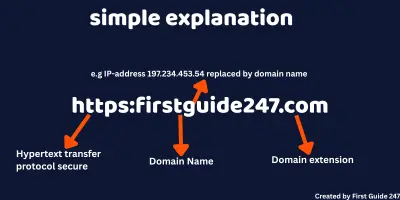
A domain or domain name is the name of a website that people type into a browser to visit it.
Example:
-
google.com -
facebook.com -
originalwholesales.com
Instead of remembering long numbers, we use domains because they’re easy to remember.
A URL tells the browser where to find a website on the web. It’s like your physical store address, without your store address people can’t find your store.
That’s how it’s also for your website, without your domain, nobody will be able to find your website.
4a. Real-Life Example  (House Address)
Think of the internet like a big city:
-
Website = a house
-
Web server = the actual land where your house is built on
-
IP address = formerly used, the house’s GPS coordinates (hard to remember)
-
Domain name = currently used, the house address (easy to remember)
4b. What are domain extensions
A domain extension is the ending part of a domain name.
For example when you: firstguide247.com
-
firstguide247 → the name
-
.com → the extension (also called TLD). TLD stands for Top-Level-Domain.
Another Examples:
-
google.com→ .com -
wikipedia.org→ .org -
amazon.co.uk→ .uk -
firstguide247.ng→ .ng
That ending part is the domain extension.
What Domain Extensions Tell Us
Domain extensions usually show what type of website it is, where it’s from or what it’s meant for.
 General Extensions
-
.com → businesses that makes profit & general websites
-
.org → organizations and NGOs
-
.net → tech / networks companies
Country Extensions
-
.ng → Nigeria
-
.de → Germany
-
.uk → United Kingdom
 Modern Extensions
-
.tech → technology
-
.blog → blogs
-
.shop → online stores
Tools and Examples to Help You Understand the Web
Here are simple tools you already use without realizing how important they are:
Search Engines
Google, Yandex and Bing help you find information on the web. They don’t store websites, they index them. Search Engines helps you find what you are looking for in the web easily.
Websites You Already Know
- YouTube → video content on the web
- Instagram → social networking on the web
- Amazon → e‑commerce on the web
- Original Wholesales → retail e‑commerce shop on the web
These are real-life examples of how powerful the web is.
Common Mistakes Beginners Make About the Web
Over the years, I’ve noticed many beginners misunderstand the web. Let me help you avoid these mistakes.
Mistake 1: Thinking the Internet and Web Are the Same
They are related, but not the same. The internet is the infrastructure; the web is a service that runs on it.
Mistake 2: Believing You Need to Be a Tech Expert
You don’t. Many successful people online started with zero knowledge.
Mistake 3: Overcomplicating Everything
The web is simpler than it looks. You just need the right guide and simple tutorials that’s why First Guide 247 exists.
Why Learning the Web Is a Smart Move
If you are serious about online growth, learning the basics of the web gives you:
- Digital independence
- Career opportunities
- Business freedom
- Long‑term skills
Understanding the web is no longer optional it’s essential.
Final Thoughts
This introduction to the web is just the beginning. My goal at First Guide 247 is to guide beginners step by step, without pressure or confusion.
If you understand how the web works, you are already ahead of many people.
Remember this: you don’t need to know everything today. You just need to start.
I’m Godstime, founder of First Guide 247, and I’ll be walking this journey with you.
Keep learning. Keep growing. The web is waiting for you and you have any questions related to the topic, kindly leave your questions in the comment section I will definitely provide with very simple answers.