

In this guide, I’m going to explain what a domain is, what domain extensions mean, and everything related to domains, in the simplest way possible. No complex tech talk. Just clear explanations that even a complete beginner can understand.
If you’re new to website development, blogging, or online business, chances are you’ve heard words like domain, domain name, or domain extension and felt a bit confused. Don’t worry, you’re not alone. I was once there too.
By the time you’re done reading, you’ll confidently know what a domain is and how it fits into building a website.
What Is a Domain? (Simple Explanation)
A domain is simply the name of a website.
It’s what people type into their browser to visit a website.
Examples of domain names:
- google.com
- facebook.com
- youtube.com
- firstguide247.com
Instead of typing complicated numbers, we use domain names because they are easy to remember.
Why Do We Need Domains?
Behind every website is a computer storage called a server, and every server has a numerical address known as an IP address.
An IP address looks like this: 172.217.16.206
Now imagine having to remember numbers like that for every website you visit.
That would be very stressful, right?.
So domains came into existence to replace those numbers with human-friendly names.
Domains make the internet easy to use.
A Real-Life Example of a Domain (House Address Analogy)
Let me explain this with a simple real-life example.
Think of the internet like a big city:
- A website is a house in the city
- A server is the land where the website is built on
- An IP address is the GPS coordinates of the server
- A domain name is the house address
When you are describing your house to someone, you don’t tell them:
“Come to latitude 6.5244, longitude 3.3792.”
Instead, you simply say:
“Come to No. 22 Allen Avenue”
That’s exactly how domains work.
What Is a Domain Name?
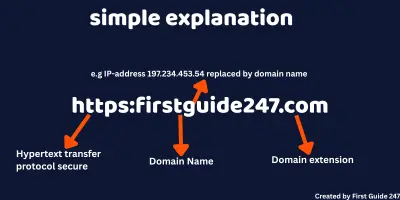
A domain name is the full website address, including the domain extension.
Example: firstguide247.com
This domain name has two main parts:
- firstguide247 – the domain name
- .com – the domain extension
When put together, they form a complete domain name.
What Is a Domain Extension?
A domain extension is the ending part of a domain name.
Examples:
- .com
- .org
- .net
- .ng
- .tech
- .us
- .uk
- .ca
- .gov
So in google.com. The .com is the domain extension.
Types of Domain Extensions Explained Simply
There are different types of domain extensions, and each one serves a purpose.
1. Generic Domain Extensions (gTLDs)
These are the most common and widely used extensions.
Examples include:
- .com – commercial businesses and general websites
- .org – organizations and NGOs
- .net – technology or network businesses
- .info – information websites
👉 Best for beginners and general use.
2. Country Code Domain Extensions (ccTLDs)
These are domain extensions linked to specific countries.
Examples:
- .ng – Nigeria
- .uk – United Kingdom
- .de – Germany
- .us – United States
👉 Best for businesses targeting a local audience in a country.
3. Sponsored Domain Extensions (sTLDs)
These are restricted domain extensions. You must qualify to use them.
Examples:
- .edu – educational institutions
- .gov – government websites
- .mil – military
👉 Beginners usually cannot register these. They are mostly used by governmental institutions and big businesses
4. New & Modern Domain Extensions
These are the newer and more niche-specific domain extensions.
Examples:
- .tech – technology websites
- .blog – blogs
- .shop – online stores
- .ai – artificial intelligence and tech brands
👉 Great for branding and modern projects.
What Is the Difference Between a Domain and Web Hosting?
This is one of the most common beginner questions, so let me clear it up.
Domain vs Hosting (Simple Comparison)
- Domain = website name (address)
- Web Hosting = is the service that enables your website files stored on the web server to be accessible on the internet. Web server and Web hosting are closely related but not the same.
Example:
If your website were a shop:
- The domain is the shop name and address
- The web hosting is the actual building
You need both to have a working website.
Can I Own a Domain Without a Website?
Yes, absolutely.
You can:
- Buy a domain today
- Build the website later
Many people buy domains just to:
- Secure a name
- Protect a brand
- Sell it in the future
How Does a Domain Work Behind the Scenes?
Here’s what happens when someone types your domain into a browser:
- The browser looks for your domain
- The domain points to your server
- The server sends your website files
- The website appears on the screen
All of this happens in seconds.
What Is Domain Registration?
Domain registration is the process of buying a domain name from a domain registrar.
You don’t actually “own” a domain forever. You can only rent it yearly or more.
Common registration periods:
- 1 year
- 2 years
- 5 years
If you don’t renew it before it expires, someone else can buy it.
What Is a Domain Registrar?
A domain registrar is a company that sells domain names.
Examples:
Domain registrars help you:
- Search for available domains
- Buy domains
- Manage renewals
What Happens If a Domain Expires?
If you don’t renew your domain:
- Your website stops working
- Emails associated with that domain stop working
- Someone else can buy it
👉 Always enable auto-renewal to avoid this.
Does a Domain Extension Affect SEO?
For beginners, here’s the simple truth:
- ❌ Domain extensions do NOT directly affect SEO or where your website ranks on search engines
- ✅ Content quality matters more
However:
- Local extensions like
.usOr .ng can help with local SEO. It means your website will be shown more to the United States and Nigerian web users - Trusted extensions like
.combuild global web users
How to Choose a Good Domain Name (Beginner Tips)
Here’s what I always recommend:
- Keep it short and simple
- Avoid hyphens
- Make it easy to spell
- Choose a trusted extension
- Make it brandable
Bad example: best-web-hosting-4-u-online.net
Good example: firstguide247.com
Common Domain Mistakes Beginners Make
Avoid these mistakes:
Buying very long domain names
Choosing strange spellings
Forgetting to renew domains
Copying popular brand names
My final thoughts
A domain is the foundation of your online presence. Whether you want to start a blog, business website, or any online brand, understanding how domains work is essential.
Once you understand:
- What a domain is
- What do domain extensions mean
- How domains work
Everything else becomes much easier. If you still have questions related to domains, or don’t understand some part of the blog guide. Leave your questions in the comment section, and I will answer them in a few hours. Thanks for reading, see you in the next one









One Response
Interesting content good one